


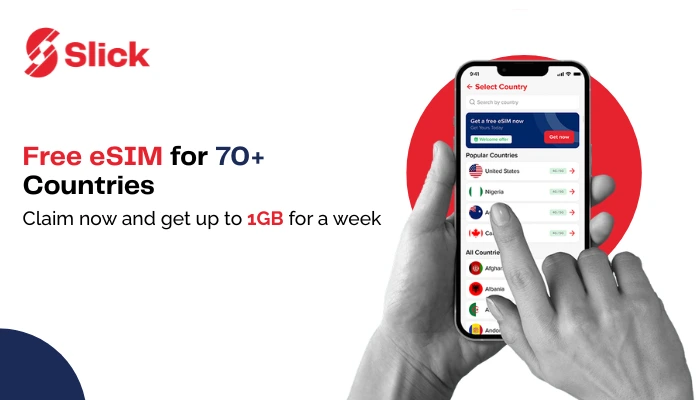
Ever landed in a new country and realized your phone’s just a camera now? No data, no messages, no maps. Just you, your suitcase, and a desperate search for Wi-Fi. It’s a traveler’s nightmare, and yet it happens all the time. Now here’s the fun part: most people don’t know they can get a free eSIM from the Slick app. Yes, even if they’ve used a paid SlickeSIM before. Surprised? You’re not alone. In this blog, I’ll walk you through exactly how to get your free SlickeSIM.
Let’s make sure you’re never offline again.
Free eSIM Data Plans by Country:
Sr # | Country Name | Data Plan |
|---|---|---|
1 | Albania | 500MB for 7 Days |
| 2 | Argentina | 100MB for 7 Days |
| 3 | Armenia | 100MB for 7 Days |
| 4 | Australia | 1GB for 7 Days |
| 5 | Austria | 1GB for 7 Days |
| 6 | Azerbaijan | 100MB for 7 Days |
| 7 | Belgium | 1GB for 7 Days |
| 8 | Bolivia | 100MB for 7 Days |
| 9 | Brazil | 100MB for 7 Days |
| 10 | Bulgaria | 1GB for 7 Days |
| 11 | Cambodia | 100MB for 7 Days |
| 12 | Chile | 100MB for 7 Days |
| 13 | Colombia | 100MB for 7 Days |
| 14 | Croatia | 1GB for 7 Days |
| 15 | Cyprus | 1GB for 7 Days |
| 16 | Czech Republic | 1GB for 7 Days |
| 17 | Denmark | 1GB for 7 Days |
| 18 | Dominican Republic | 100MB for 7 Days |
| 19 | Egypt | 100MB for 7 Days |
| 20 | El Salvador | 100MB for 7 Days |
| 21 | Estonia | 1GB for 7 Days |
| 22 | Finland | 1GB for 7 Days |
| 23 | France | 1GB for 7 Days |
| 24 | Germany | 1GB for 7 Days |
| 25 | Greece | 1GB for 7 Days |
| 26 | Guatemala | 100MB for 7 Days |
| 27 | Honduras | 100MB for 7 Days |
| 28 | Hungary | 1GB for 7 Days |
| 29 | India | 100MB for 7 Days |
| 30 | Ireland | 1GB for 7 Days |
| 31 | Italy | 1GB for 7 Days |
| 32 | Jamaica | 100MB for 7 Days |
| 33 | Jersey | 1GB for 7 Days |
| 34 | Jordan | 100MB for 7 Days |
| 35 | Kazakhstan | 1GB for 7 Days |
| 36 | Kenya | 100MB for 7 Days |
| 37 | Kuwait | 100MB for 7 Days |
| 38 | Kyrgyzstan | 1GB for 7 Days |
| 39 | Latvia | 1GB for 7 Days |
| 40 | Lithuania | 1GB for 7 Days |
| 41 | Luxembourg | 1GB for 7 Days |
| 42 | Macao (China) | 1GB for 7 Days |
| 43 | Mexico | 100MB for 7 Days |
| 44 | Morocco | 500MB for 7 Days |
| 45 | Netherlands | 1GB for 7 Days |
| 46 | Nicaragua | 100MB for 7 Days |
| 47 | Niger | 100MB for 7 Days |
| 48 | Nigeria | 100MB for 7 Days |
| 49 | Norway | 1GB for 7 Days |
| 50 | Pakistan | 100MB for 7 Days |
| 51 | Panama | 100MB for 7 Days |
| 52 | Paraguay | 100MB for 7 Days |
| 53 | Peru | 100MB for 7 Days |
| 54 | Poland | 1GB for 7 Days |
| 55 | Portugal | 1GB for 7 Days |
| 56 | Qatar | 100MB for 7 Days |
| 57 | Reunion | 100MB for 7 Days |
| 58 | Romania | 1GB for 7 Days |
| 59 | Russia | 1GB for 7 Days |
| 60 | Saudi Arabia | 1GB for 7 Days |
| 61 | Senegal | 100MB for 7 Days |
| 62 | Serbia | 100MB for 7 Days |
| 63 | Slovakia | 1GB for 7 Days |
| 64 | Slovenia | 1GB for 7 Days |
| 65 | South Africa | 100MB for 7 Days |
| 66 | South Korea | 1GB for 7 Days (nonhkip) |
| 67 | Spain | 1GB for 7 Days |
| 68 | Sweden | 1GB for 7 Days |
| 69 | Switzerland | 1GB for 7 Days |
| 70 | Tanzania | 100MB for 7 Days |
| 71 | Ukraine | 1GB for 7 Days |
| 72 | United Arab Emirates | 100MB for 7 Days |
| 73 | United Kingdom | 1GB for 7 Days |
| 74 | United States | 1GB for 7 Days |
| 75 | Uruguay | 100MB for 7 Days |
Let’s dive into how to get a free eSIM from Slick in minutes:
Step 1: Open the Slick App
If you already have the app, great, open it. If not, download it from your App Store or Google Play and sign in.
Step 2: Look for the Free eSIM Banner
At the top of your app screen, you’ll see a banner that says something like “Claim Your Free eSIM.” This only appears if you haven’t availed of your free eSIM yet. Tap it. Or, you can simply tap on ‘eSIM’ to start the process of getting your free eSIM.
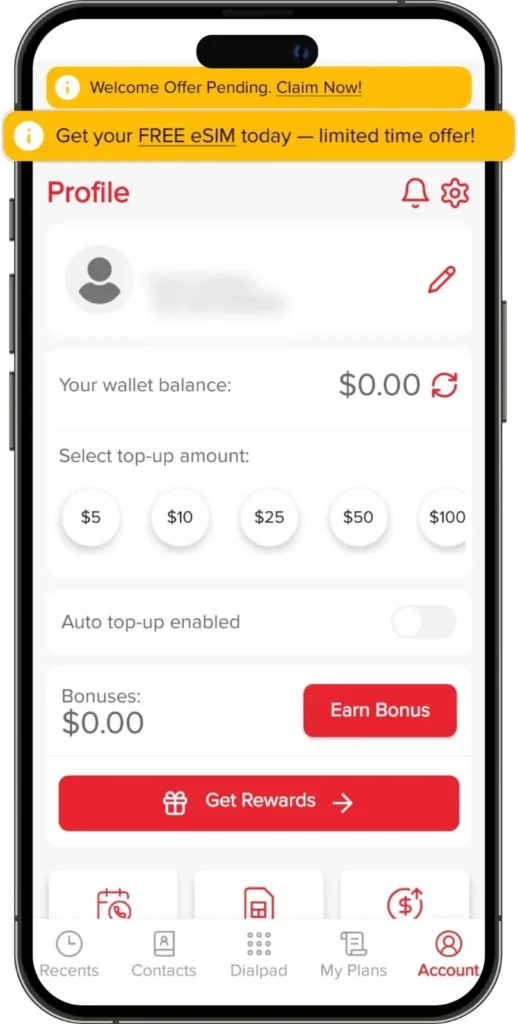
Step 3: Tap ‘Get Now.’
Here, tap ‘Get Now.’
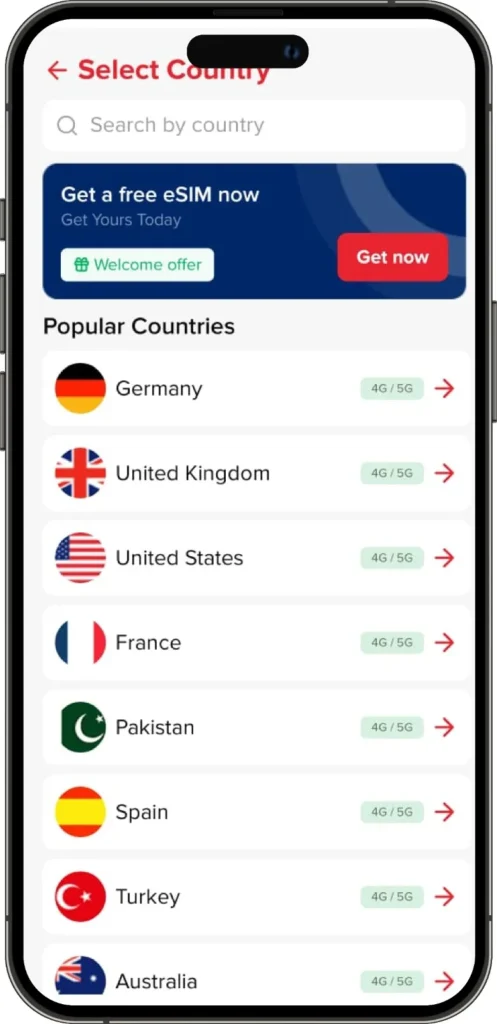
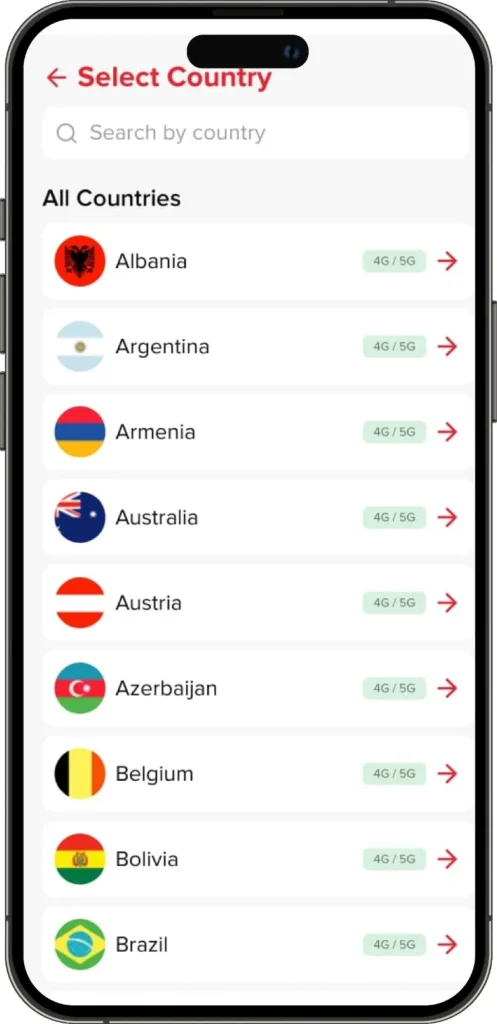
Step 4: Choose Your Destination
Pick the country where you’ll be traveling. Free eSIM covers 70+ destinations.
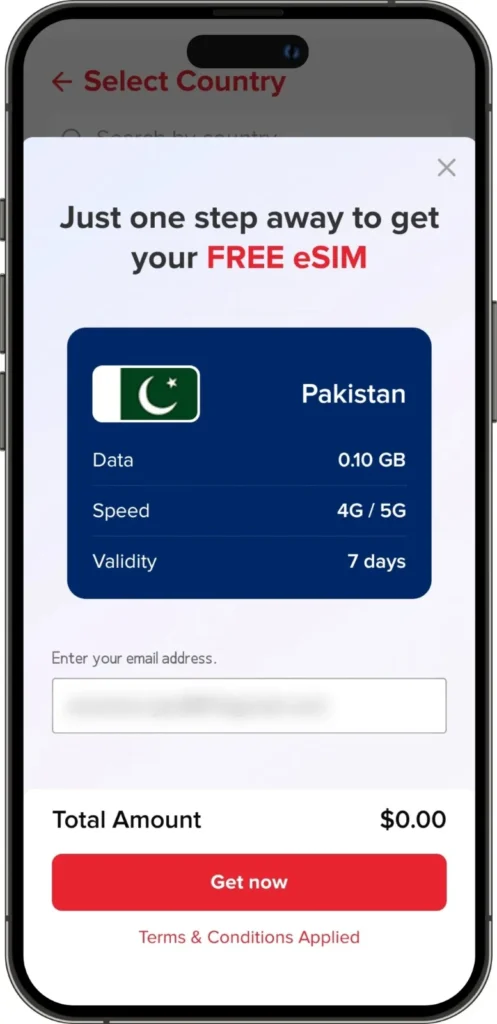
Step 5: Tap “Get Now.”
Once you tap this, Slick confirms your selection and prepares your eSIM instantly.
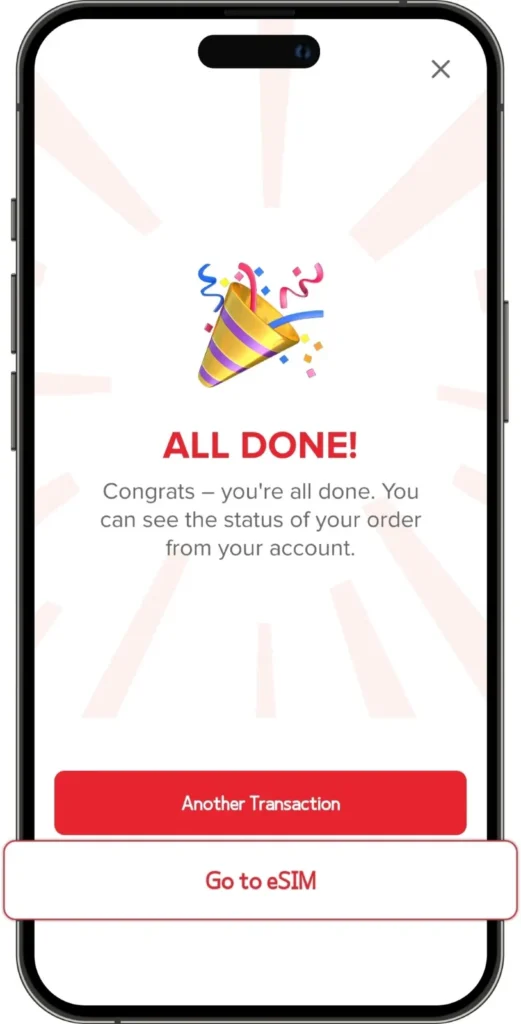
Step 6: Tap “Go to eSIM.”
The screen will say All Done. That’s your green light to proceed. Now tap “Go to eSIM.”
Step 7: Install Your eSIM
Now tap “Install eSIM.” Just make sure your phone supports eSIM before you do this. (Most modern iPhones, Samsungs, and Google Pixels do.)
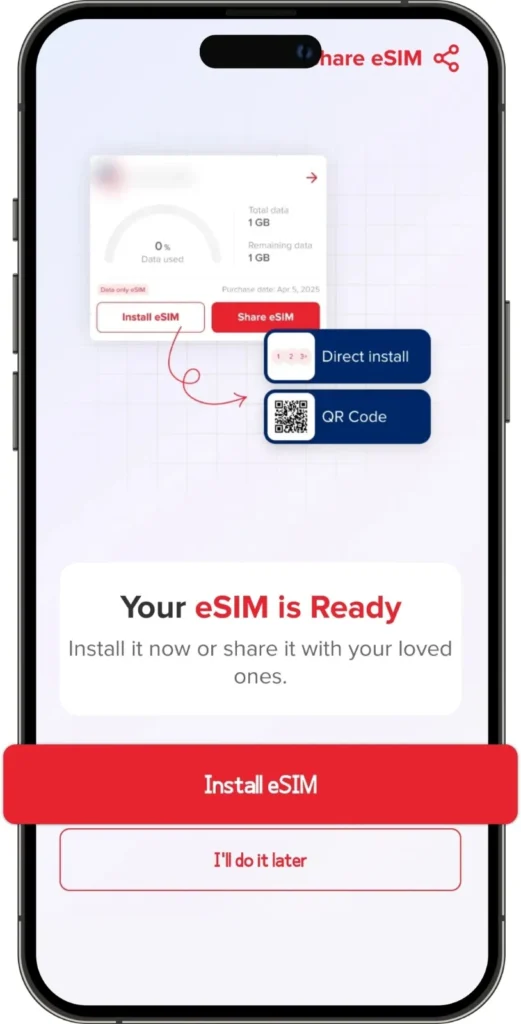
Step 8: Choose Installation Method
You’ll get two options:
- Direct Install: Tap “Install Now” and follow the simple on-screen instructions to install eSIM in minutes.
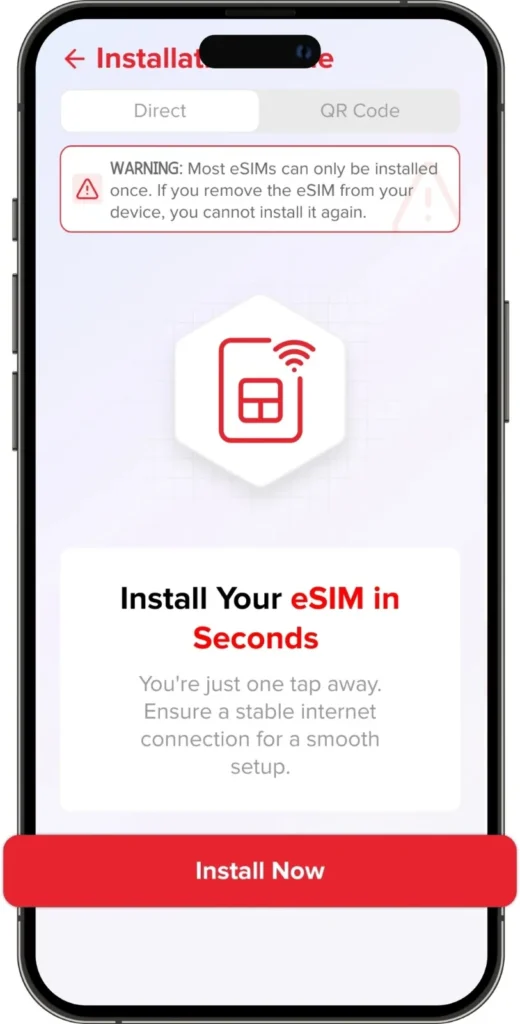
- QR Code Install: Tap “QR Code” if you want to install it via scanning a QR code.
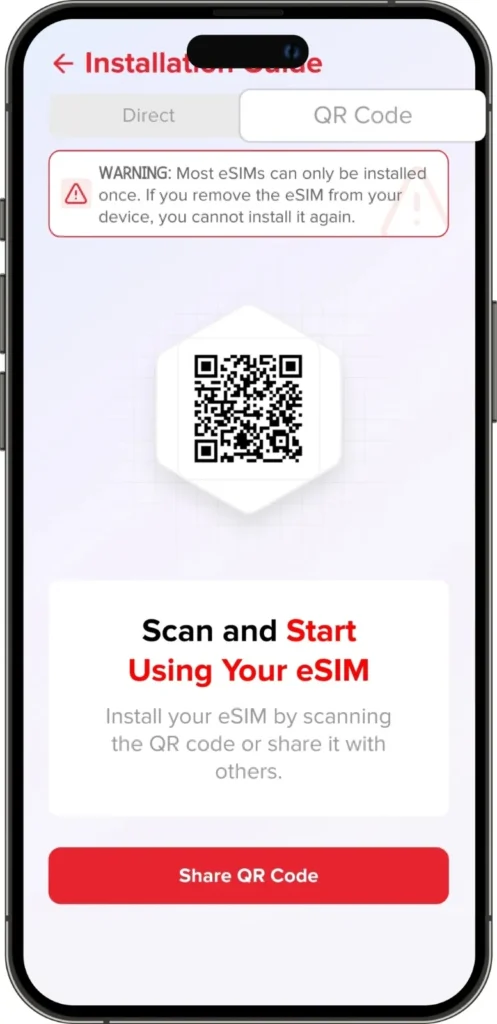
If you want detailed guides, Slick has separate blogs for installing an eSIM on iPhone and installing on Android. Check them if you’re new to this.
If you go back to your account, tap on ‘eSIM’; here you can see details about your free eSIM.
Step 9: That’s It—You’re Online!
Once the installation is done, your eSIM will activate automatically when your phone catches a signal abroad. No calling customer support, no verification delays. Just instant data.
You’ve officially learned how to get a free eSIM from Slick.
Feels good, right?
Why You Should Claim Your Free eSIM Today
Now, you might be thinking:
“Okay, cool—but why now?”
Here’s why waiting is a bad idea:
- Free offers don’t last forever. Slick might change this promo anytime, and you don’t want to miss it.
- It’s perfect for testing. Maybe you’re curious how eSIMs work. This lets you try it risk-free.
- Instant peace of mind. When you know you’ve got data ready for 70+ countries before landing, travel just feels lighter.
Conclusion
You don’t just get free data. You get freedom. Whether you’re a student, traveler, or remote worker, Slick’s free eSIM lets you stay connected in over 70 countries without juggling SIM cards or overpriced airport kiosks. So, open your app, tap that banner, and get your free eSIM today. Because nothing beats landing in a new country and seeing your phone instantly light up with notifications.
Quick FAQs About Getting a Free eSIM
i
Q1: Who’s eligible for the free eSIM?
Anyone who hasn’t claimed a free SlickeSIM before. Even if you’ve used a paid eSIM in the past, this free one is still available for you.
iQ2: Does the free eSIM work everywhere?
Not everywhere, but it does work in 70+ popular travel countries. When you’re claiming your free eSIM, you can simply select the country you’re traveling to and check if it’s covered.
i
Q3: How long does it take to activate my free eSIM?
It activates instantly as soon as your phone picks up a signal in your destination country.
Q4: Can I install it before I travel?
Absolutely. In fact, it’s smart to do it beforehand so your data starts working right after you land.
Q5: What if I face any issues during installation?
Slick’s support team is available 24/7 via WhatsApp or email. Just send them a quick message, and they’ll help you out in minutes.
iQ6: How much data do I get with my free eSIM?
You get up to 1GB of data for one week with your free eSIM. With free data, you start chatting, sharing, or streaming the moment you land.