





If you’ve ever paused before dialing someone abroad because you were scared of what your phone bill might look like later… you’re not alone. Why does a five-minute call to another country sometimes feel more expensive than a nice meal? For years, international calling felt complicated, pricey, and honestly stressful. You needed calling cards, long access numbers, special packs, or expensive mobile plans, and half the time, the call quality wasn’t even good.
But things have changed.
Today, staying connected globally doesn’t require a big budget or a complicated setup. In fact, there are multiple proven ways to make international calls for free using apps, Wi-Fi calling, and online platforms — and most people aren’t even using half of them.
This guide breaks down:
- Why old-school international calls cost so much
- The most reliable ways to make free international calls
- How apps like Slick give you free app-to-app calling
- Simple steps to start calling abroad today
Let’s start with the one question everyone wonders about.
Why Are International Calls Still So Expensive?
You’d think that in 2026, calling across borders would be as cheap as sending a text. But traditional carriers still charge high fees. Here’s why:
1. Carriers Add Multiple Layers of Fees
International calls bounce through multiple operators and networks. Each one takes a small cut, which becomes a big cut for you.
That’s why a normal carrier in the US or UK might charge anywhere from 50 cents to 3 dollars per minute.
2. Roaming Is Still a Money Trap
If you’ve ever traveled abroad and returned home to a heart-stopping phone bill… blame roaming.
When your phone connects to another country’s network, your carrier charges premium fees for every incoming and outgoing call.
3. Old Infrastructure = High Costs
Traditional calling relies on physical networks:
- Cables
- Satellites
- Switching stations
Everything must be maintained, and those costs get passed on to you.
4. Carriers Don’t Have Strong Competition
In many countries, telecom companies operate in a near-monopoly. When consumers have fewer choices, prices stay high. Simple as that.
So, is there a better way?
Yes, and it’s way easier than most people think.
How to Make International Calls for Free: Best Working Methods
Let’s get to the good part: how to actually call someone abroad without spending anything. You can make international calls for free by using VoIP apps, Wi-Fi calling, social media platforms, or online calling websites. These services use internet connections instead of traditional phone networks, helping you avoid roaming fees and expensive per-minute charges.
Below are the most reliable (and easy) ways people around the world make free international calls.
1. Use VoIP Calling Apps (The Easiest Free Method)
VoIP stands for Voice Over Internet Protocol, which simply means your calls travel over the internet, not expensive phone networks. If both people have the same app, calling is free.
Popular VoIP apps include:
- Slick app
- Facebook Messenger
- Viber
- Google Voice
These apps don’t charge per minute. If you want a detailed breakdown, check our guide on best free international calling apps. You just need Wi-Fi or mobile data. Think of VoIP like sending an email instead of sending physical mail: Fast, free, borderless.
2. Turn On Wi-Fi Calling (Most People Forget This Exists)
Your smartphone already has a feature that lets you call internationally without paying roaming fees.
Wi-Fi calling uses any available Wi-Fi network to place calls, even when you’re abroad. You can also read our complete guide on low-cost international calling options to compare alternatives.
How to turn it on:
- iPhone
Settings → Mobile Data → Wi-Fi Calling → Turn On
- Android
Settings → Network & Internet → Wi-Fi Calling → Enable
Once it’s on, your phone will use Wi-Fi whenever possible, saving you money without changing how you dial.
Important: To avoid roaming charges, turn off mobile roaming in your phone settings and use Wi-Fi calling or VoIP apps instead. These services route calls over the internet, so you won’t be charged expensive international carrier rates.
3. Call Through Social Media Apps
No need to memorize country codes; if the person is on your contact list, you just tap the call button.
Apps like:
- Signal
- Telegram
- Snapchat
All of these apps offer free voice and video calling. They are perfect for casual calls with friends and family.
4. Use Free Calling Websites
If you don’t want to download anything, there are websites that offer free international calling directly from your browser.
Examples:
- PopTox
- iEvaphone
They generally give limited free minutes per day, but they’re great for quick calls.
Do note: call quality may vary.
5. Use Free Online Meeting Platforms
Not every call needs a phone number. If both people are online on these platforms, they get unlimited free calling:
- Google Meet
- Zoom
- Microsoft Teams
- Slack
These platforms are fantastic for long conversations or business meetings.
Which Free Calling Option Is Best?
Free apps are great, but they all come with small trade-offs:
| Free Method | Works For | Limitations |
| WhatsApp/Messenger | App-to-app calling | Both users must have the app |
| Wi-Fi Calling | Regular dialing | Not supported by all carriers |
| Free websites | Quick calls | Limited minutes, inconsistent quality |
| Zoom/Meet | Long calls | Needs stable internet & both users online |
Best Apps for Free International Calling (Quick Comparison)
If you’re wondering which app is best for making free international calls, here’s a simple comparison:
| App | Free App-to-App | Call Landlines | Ads | Best For |
|---|---|---|---|---|
| Slick | Yes | Yes (with plan) | No | All-purpose calling |
| Yes | No | No | Friends & family | |
| Viber | Yes | Limited | Some | Casual calls |
| Google Voice | Limited | Yes | No | US-based users |
Other apps allow free app-to-app calls, not all of them support calling real mobile numbers or landlines. Depending on your needs, you may want the Slick app that offers both free app-to-app calling and affordable international plans to call landline and mobiles.
Why Slick Is a Better Way to Make Free International Calls
Let’s be honest, “free calling apps” often come with hidden downsides:
- Time limits
- Ads
- Low call quality
- App-to-app only (you can’t call real phone numbers)
Slick solves all of these.
Here’s what makes it different:
Unlimited Free App-to-App Calls
If both people have Slick installed, the call is:
- Unlimited
- Free
- High quality
- End-to-end encrypted
You can talk for hours without paying a single cent.
Crystal-Clear Call Quality
Unlike some free apps that compress audio, Slick uses optimized VoIP routing to give you a stable, clear connection. It’s great for:
- Families abroad
- Long-distance couples
- International students
- Business calls
Call Landlines and Mobiles
When you want to call offline numbers or people who don’t use the Slick app, you can subscribe to calling plans at affordable rates. With these plans, you can make calls to landlines and mobiles in over 200 countries.
- No hidden fees
- Flexible plans
- Call landlines and mobiles
Now, let’s explore how to make free international calls using Slick.
How to Make Free International Calls Using Slick?
Here are 3 simple steps to make international calls for free via the Slick app.
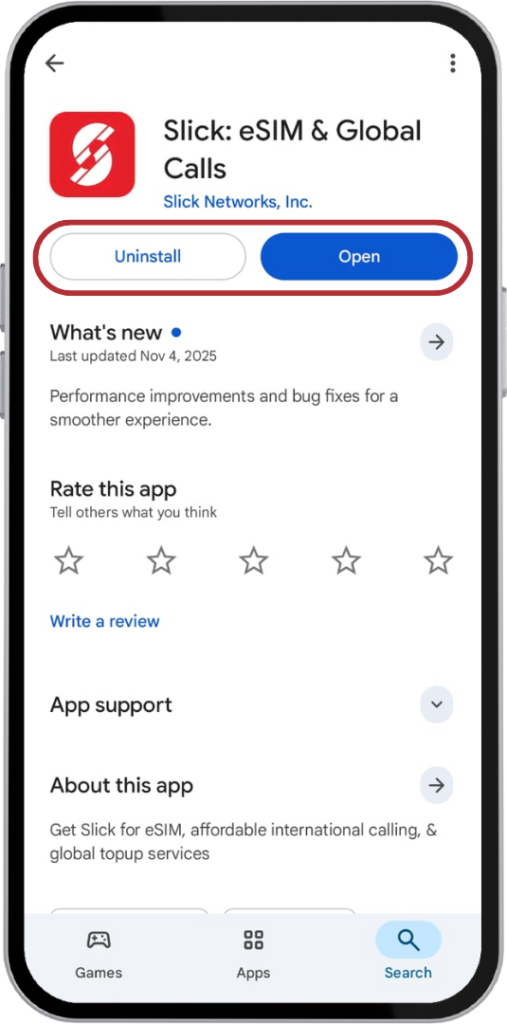
1 – Download & Install the Slick app – The app is available on Google Play Store and the Apple App Store.
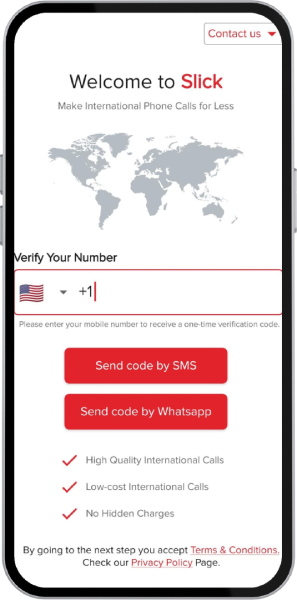
2 – Sign Up – Register with your phone number.
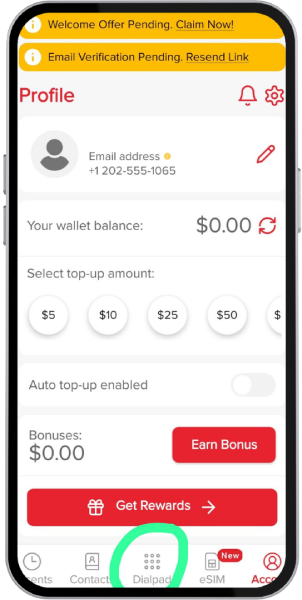
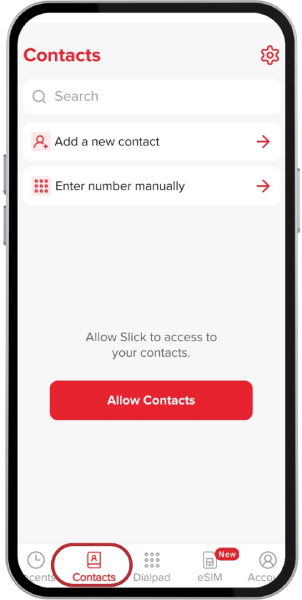
3 – Dial Your International Number – Hit the dial pad, enter your number, and make free Slick-to-Slick international calls.
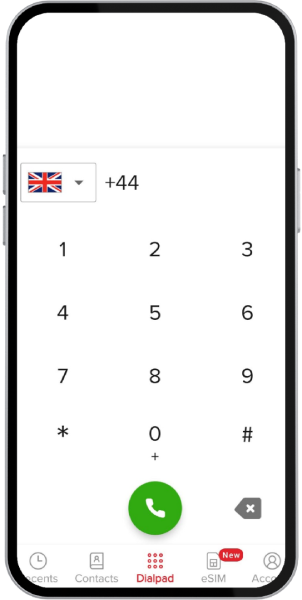
You don’t have to manually enter the country code; the app automatically handles it for you.
Or give Slick access to your contacts and call them directly from the app without manual dialing.
Conclusion:
Staying in touch with your people across borders shouldn’t feel complicated or expensive. Sure, there are plenty of “free” ways to make international calls today, including Wi-Fi calling, VoIP apps, and even random calling websites. But most of them come with strings attached: limited minutes, shaky audio, or surprise charges when you least expect them. So, if you’ve been hunting for a way to make international calls for free without dealing with low quality, confusing country codes, or hidden catches, the Slick app makes it genuinely easy.
Why let high costs hold you back? Download Slick today and start making international calls without limits.
Frequently Asked Questions
Can I really make international calls for free?
Yes! Apps like Slick, WhatsApp, and Viber let you make free calls when both users have the same app. Slick also offers affordable plans to call any mobile or landline worldwide.
What makes Slick different?
You get unlimited app-to-app calls, clear audio, and affordable plans for calling landlines and mobile numbers.
Do I need Wi-Fi or data?
Yes. Slick works over Wi-Fi or mobile data and uses very little bandwidth.
Can I call someone who doesn’t have the app?
Yes! With Slick’s low-cost plans, you can call any number worldwide, even if the recipient isn’t on Slick.
What is the best app for free international calls?
The best app depends on your needs. If both users have the same app installed, options like, WhatsApp, and Viber allow free app-to-app calling. If you need to call landlines or mobile numbers, along with free app to app calls, use the Slick app that offers affordable international calling plans.
Is Slick available on both Android and iPhone?
Absolutely. Download it from the App Store or Google Play Store and start calling within minutes.